Blog

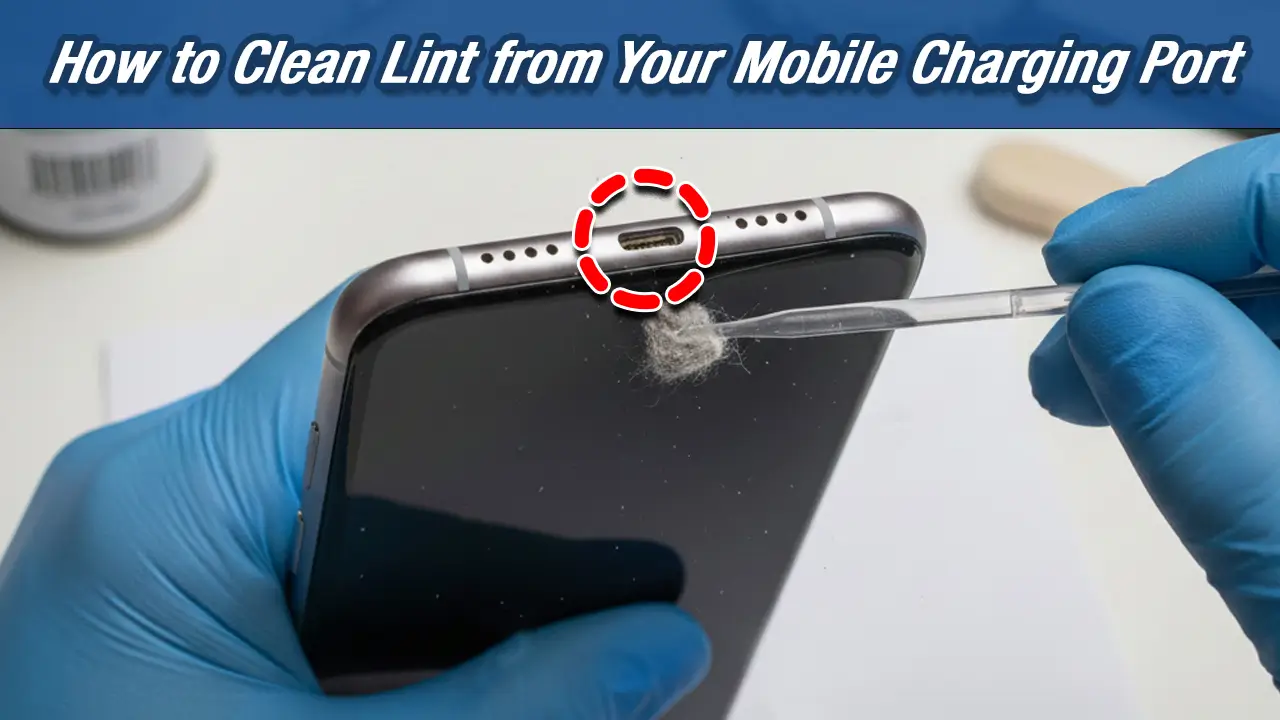
How to Clean Lint from Your Mobile Charging Port – DIY Cleaning Guide
If you’re experiencing charging issues with your phone, it might not always be the charger or the cable. Lint and dust buildup inside your mobile charging port can interfere with the connection, leading to slow charging, charging interruptions, or even failure to charge at all. Fortunately, cleaning your charging port is a simple DIY fix, and in this guide, we’ll walk you through the steps to do it safely and effectively. Know more about mobile Charging Port Problems & Solutions.
Step-by-Step DIY Guide to Clean Lint from Your Mobile Charging Port
Tools You’ll Need to Clean Your Charging Port
To clean lint from your mobile charging port, you don’t need any special tools. Here are the essentials:
- Compressed air – To blow away dust and lint.
- Cotton swab – A soft tool to remove lint gently.
- Toothpick – A fine tool to carefully scrape away dirt without damaging the port.
- Toothbrush (optional) – For deeper cleaning if needed.
How to Safely Remove Lint Using Compressed Air
Compressed air is one of the best tools for cleaning your mobile charging port without causing any damage. Follow these steps:
- Turn off your phone to avoid accidental damage during cleaning.
- Hold the compressed air can upright and position the nozzle near the charging port.
- Gently blow short bursts of air into the port. Do not tilt the can or spray in one continuous stream, as this may cause moisture to enter the port.
- Check the port after each burst to see if the lint has been dislodged.
Compressed air effectively removes loose particles without touching the pins inside the port, keeping your phone safe.
Cleaning Your Charging Port with a Cotton Swab or Toothpick
If compressed air doesn’t do the trick, you can use a cotton swab or toothpick to remove the lint manually. Here’s how:
- Gently insert a cotton swab into the charging port. If you’re using a toothpick, ensure it’s thin and clean to avoid damaging any components.
- Lightly scrape the lint out in a vertical motion, making sure you don’t push it further into the port.
- For stubborn lint, you may need to use a toothpick carefully; always remember to do so gently to avoid damaging the charging pins.
How to Use a Toothbrush for Deep Cleaning the Charging Port
If there’s a significant buildup inside your charging port, a toothbrush can help. Here’s the method:
- Get a small, soft-bristled toothbrush (preferably one you don’t use for your teeth!).
- Gently brush the inside of the port, ensuring the bristles reach any dust or lint stuck in there.
- Be cautious not to exert too much pressure, as the pins inside the charging port are delicate.
Tips to Prevent Lint Build-Up in Your Charging Port
How to Protect Your Charging Port from Dust and Lint
Prevention is always better than a cure. To keep your charging port clean for longer:
- Use a port cover – A small dust plug can prevent lint and dirt from entering the port.
- Avoid pocketing your phone – Lint from your pockets can easily accumulate inside the port. Instead, place your phone in a clean pouch or case.
- Store in a clean environment – Keeping your phone in a bag with less dust can reduce the amount of lint that enters the port.
Regular Maintenance Tips to Keep the Charging Port Clean
To avoid future problems with lint buildup, consider these regular maintenance tips:
- Clean the charging port every few months, or sooner if you notice charging issues.
- Always turn off your phone before cleaning to ensure safety and prevent accidental short circuits.
- If you live in a dusty area or often carry your phone in a bag or pocket, check and clean your charging port more frequently.
Fixing Charging Issues Caused by Lint in the Charging Port
When to Seek Professional Help for Charging Port Issues
If cleaning the lint out of your charging port doesn’t fix your charging issues, the problem might go beyond just debris. In this case, it’s best to consult a professional mobile technician. You can visit Nur Telecom. Possible reasons for persistent charging issues could include:
- Damaged charging pins – If the pins are bent or broken, they may require repair or replacement.
- Internal circuit problems – Faults within the phone’s charging circuit may need expert attention.
Common Problems Caused by Lint in the Charging Port
How Lint Affects Your Phone’s Charging Performance
Lint buildup in your charging port can significantly affect your phone’s charging speed and functionality. Over time, the lint can block the connection between the charging cable and the port, causing the following issues:
- Slow charging speeds
- Intermittent charging
- Failure to charge – Your phone may not recognize the charger.
Why It’s Important to Clean Lint Out Regularly
Regular cleaning of your mobile charging port prevents lint from obstructing the connection and ensures efficient charging. By maintaining a clean port, you’ll extend the lifespan of your phone’s charging components and avoid unnecessary repair costs.
FAQs
How do I safely clean lint from my phone’s charging port?
Use a soft cotton swab or a toothpick to gently remove lint. Avoid sharp objects that can damage the pins.
Can compressed air clean lint from my mobile charging port?
Yes, compressed air is a great way to blow out lint without making physical contact with the pins.
Does lint in the charging port affect charging speed?
Yes, lint can block the connection between the charging cable and port, slowing down or preventing charging.
How often should I clean my mobile charging port?
Check your charging port every few months, or sooner if you experience charging problems.