Blog

Why Do Smartphone Batteries Swell? Causes, Risks, and Solutions
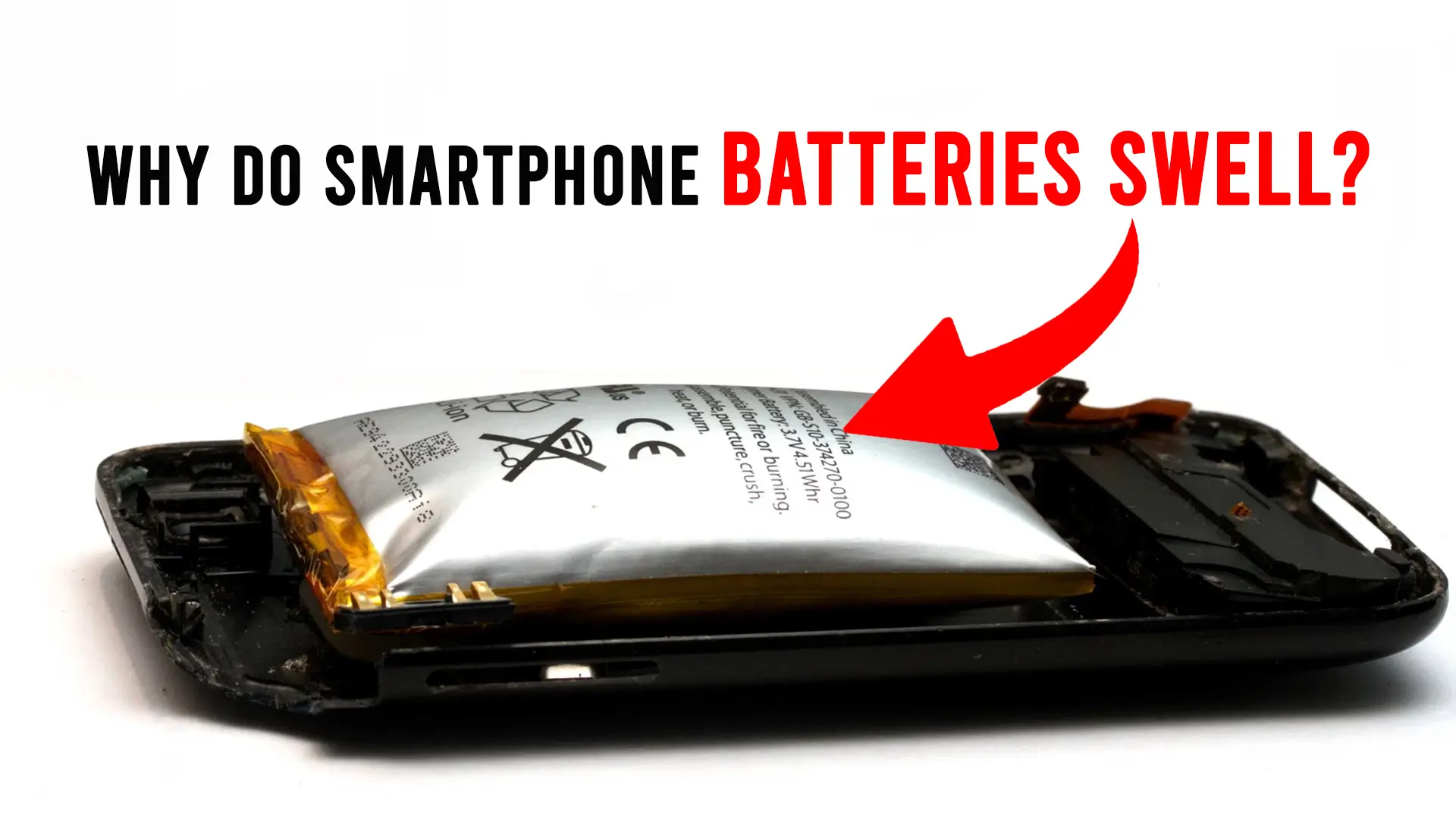
Smartphone battery swelling is a common yet serious issue affecting many users today. If you’ve noticed your phone’s back cover bulging or your phone not functioning properly, chances are, you may be dealing with a swollen battery. Understanding why batteries swell and how to prevent it can save your phone, and potentially prevent hazardous accidents.
Understanding Smartphone Battery Swelling
What Causes Smartphone Battery Swelling?
Battery swelling can occur for several reasons, most commonly due to overcharging, excessive heat, or poor manufacturing. When you leave your smartphone plugged in overnight or use low-quality chargers, the battery can overheat, leading to gas buildup inside. This causes the battery’s casing to swell. Sometimes, poor manufacturing processes can result in weak or faulty batteries, increasing the likelihood of swelling over time. Additionally, aging batteries naturally degrade, which may lead to swelling due to chemical changes. Know about other common mobile battery issues.
What Happens When Smartphone Batteries Swell?
When a smartphone battery swells, the resulting physical changes can significantly affect your phone’s performance. As the battery expands, it exerts pressure on the phone’s internal components, potentially causing screen damage and compromising the phone’s structural integrity. The swelling is often a sign that the battery is malfunctioning, and continued use can increase the risk of fire or explosion if left unchecked.
Signs of a Swollen Smartphone Battery
If your smartphone battery is swollen, there are a few clear signs. These include a noticeable bulge on the back cover, an unresponsive touchscreen, or reduced battery life. The phone may feel unusually warm during use, and in some cases, the screen may lift off the phone’s body. If you notice any of these symptoms, it’s crucial to stop using the phone immediately.
Preventing and Fixing a Swollen Smartphone Battery
How to Prevent Battery Swelling in Smartphones
Preventing battery swelling starts with good charging habits. Use only the recommended charger for your phone and avoid using non-original or low-quality chargers. Overcharging and overheating are the leading causes of battery damage, so it’s important to unplug your phone once it’s fully charged. Keep your phone in a cool, dry environment and avoid exposing it to extreme temperatures, especially when charging.
Fixing a Swollen Smartphone Battery
Fixing a swollen smartphone battery is not a DIY job. If you notice swelling, it’s safest to stop using the device and consult a professional technician. While some users attempt to remove and replace the battery themselves, this can be dangerous, especially if the battery is punctured or damaged in the process. It’s always recommended to visit a repair service to ensure proper safety protocols are followed.
When Should You Replace a Swollen Phone Battery?
If your smartphone battery has swelled to a point where it’s noticeable, it’s time to replace it. Continuing to use a device with a swollen battery can be risky, as the swelling can lead to leakage or a fire hazard. Replacing the battery can prevent further damage to the phone and ensure your safety.
Risks of Using a Smartphone with a Swollen Battery
Can a Swollen Battery Explode in a Smartphone?
Yes, a swollen smartphone battery poses a significant risk of explosion or fire. As the battery swells, it may rupture, releasing harmful chemicals and causing a fire. This is why it’s essential not to ignore a swollen battery and to replace it promptly.
What to Do If My Smartphone Battery is Swollen?
If you notice your smartphone battery is swollen, immediately power down your device. Don’t try to force it open or remove the battery yourself. Instead, take it to a certified repair center. A technician can safely remove and replace the battery to prevent any potential hazards.
Best Practices for Maintaining Your Smartphone Battery
Battery Maintenance Tips
To extend your smartphone’s battery lifespan, it’s important to follow good battery maintenance practices. Charge your phone when the battery level drops below 20%, and unplug it once it reaches 100%. Avoid using your phone in hot environments, and remove any case that may trap heat while charging. By maintaining these habits, you can reduce the likelihood of battery swelling and extend your phone’s battery health.
How to Safely Dispose of a Swollen Smartphone Battery
If you have a swollen battery that needs to be disposed of, it’s important to follow proper disposal methods. Never throw it in the trash. Instead, take it to an electronic recycling center or a store that offers battery disposal services. These centers can safely recycle the battery and ensure it doesn’t pose an environmental risk.
Conclusion
Smartphone battery swelling is a serious issue that can cause performance problems and safety risks if left unaddressed. Understanding the causes, signs, and prevention methods is key to protecting your device and ensuring your safety. If you notice any signs of swelling, replace the battery immediately to avoid further damage and potential hazards.
“If you notice your smartphone battery swelling, don’t wait! Visit our professional repair service today to ensure your device’s safety.”
FAQs
Why does my smartphone battery swell after charging?
Excessive heat during charging or using an incompatible charger can cause the battery to swell.
Does using a non-original charger cause smartphone battery swelling?
Yes, third-party chargers often lead to overheating, which stresses the battery and may cause swelling.
Can a swollen battery in a smartphone explode?
While rare, a swollen battery can explode or catch fire if not handled properly.
How long does it take for a smartphone battery to swell?
Battery swelling usually occurs over time, depending on the charging habits and the battery’s quality, but it can take weeks to months to show noticeable effects.
Should you continue using a phone with a swollen battery?
No, continuing to use a phone with a swollen battery can be dangerous. Replace it immediately for safety.